
Understanding Your DnD Character Sheet
Before you dive into rolling dice and slaying dragons, it helps to know what your character sheet actually does. This one page holds the numbers that shape your hero and the story details that make them feel real. It’s the dashboard of combat and the doorway to decision making. If you want to follow along and fill in a sheet just like the ones in this guide, you can grab the best DnD character sheet ever right here with this link.
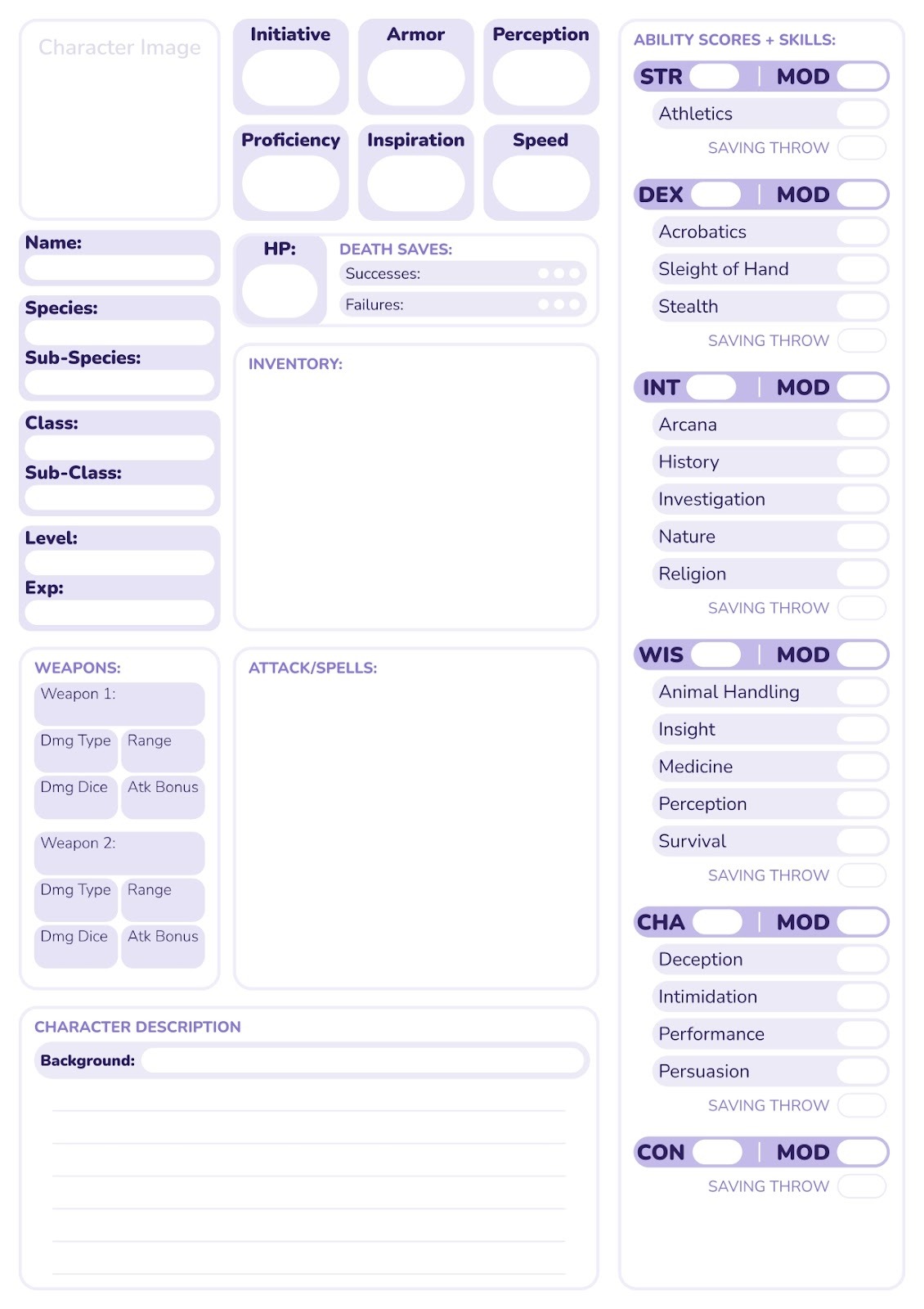
Here’s what a totally blank character sheet looks like. More specifically, this is the one we introduced in the last article. There, you can find a fillable pdf version of the same sheet, and use that to follow along with this article. Or, you can use a website like Canva to add textboxes and your character’s image easily.
Step One: Core Identity and Concept
Think of your DnD character sheet as both a control panel and a diary page. The numbers show how your character acts in the game. The story bits show who they are when the dice aren’t rolling. You need both sides for a hero that feels real at the table. Another thing to consider at this stage is your character’s lore. Their background can majorly impact how you choose their ability scores, skills, and proficiencies, so it’s important to really nail it early on.
You can start in one of many ways. My favorite method is to picture your character as a person (or, creature) first. What are they like? Are they kind, bold, quiet, or a little chaotic? What’s their class, species, etc? Speaking of classes and subclasses, you have quite a few to choose from. Here’s a little chart comparing and contrasting the main classes you’ll come across in DnD, as well as some of their respective subclasses.
Class
Example Subclasses
Support Style / Role Focus
Key Sheet Numbers Affected
Barbarian
Path of the Berserker, Totem Warrior, Ancestral Guardian, Storm Herald, Zealot
Frontline bruiser, damage sponge, sometimes team guard
Hit points, melee damage, resistances, rage uses
Bard
College of Lore, Valor, Glamour, Swords, Whispers, Eloquence
Party buffer, face, skill expert
Bardic Inspiration dice, spell save DC, skill bonuses
Cleric
Life, Light, Trickery, Tempest, Grave, War, Knowledge, Nature, Forge, Order
Healer, support caster, divine blaster or protector
Spell save DC, spell attack bonus, healing/damage per spell, Channel Divinity uses
Druid
Circle of the Land, Moon, Shepherd, Dreams, Spores, Stars
Nature control, healer, shapeshifter, summoner
Spell save DC, wild shape uses and forms, summon HP and bonuses
Fighter
Champion, Battle Master, Eldritch Knight, Samurai, Cavalier, Rune Knight
Weapon expert, defender, sometimes half caster
Attack bonus, damage, hit points, Action Surge, maneuvers or limited spell slots
Monk
Way of the Open Hand, Shadow, Four Elements, Kensei, Mercy, Sun Soul
Mobile striker, control, sometimes ranged or support
Ki points, unarmored AC (Dex + Wis), number of attacks, save DCs on monk features
Paladin
Oath of Devotion, Vengeance, Ancients, Conquest, Crown, Redemption, Glory
Frontline tank, smiter, aura and support specialist
Hit points, smite damage, aura range/effects, spell save DC
Ranger
Hunter, Beast Master, Gloom Stalker, Horizon Walker, Monster Slayer, Swarmkeeper
Skirmisher, scout, ranged or melee damage with nature magic
Weapon attack bonus, hit points, limited spell slots, favored features (foes/terrain)
Rogue
Thief, Assassin, Arcane Trickster, Swashbuckler, Inquisitive, Scout
Sneak attacker, scout, skill expert, sometimes half caster
Sneak attack dice, skill bonuses, initiative, AC from Dexterity
Sorcerer
Draconic Bloodline, Wild Magic, Shadow, Storm, Divine Soul, Aberrant Mind
Innate blaster or controller, flexible spell tweaks
Spell save DC, spell attack bonus, sorcery points, metamagic uses
Warlock
Fiend, Archfey, Great Old One, Hexblade, Celestial, Genie
Pact based blaster, debuffer, gish if Hexblade
Pact spell slots, spell save DC, invocations, damage on key cantrips (like eldritch blast)
Wizard
School of Evocation, Divination, Abjuration, Necromancy, Illusion, Enchantment, Transmutation, War Magic
Full caster, specialist in chosen school
Spell save DC, spell attack bonus, spell slots, prepared spells, school specific features
You also have to choose your character’s species, and in some cases, their subspecies, too. This choice is more than just looks or vibes. Your species often gives ability score bonuses, movement speed, special senses, and traits like darkvision or resistance to certain damage. A subspecies can add even more features, such as extra spells, new proficiencies, or different ability boosts. All of these details go right on your character sheet, usually in your traits section and in your ability scores. Your species can change how you play at the table, from how you move around a dungeon to how certain spells and abilities feel in the story. You’ll notice that not all species have a subspecies. So, this bit may not apply to you if you choose a species that doesn’t have (or doesn’t require) a subspecies.
Species
Subspecies
Human
None / Variant Human
Dwarf
Hill Dwarf, Mountain Dwarf
Elf
High Elf, Wood Elf, Dark Elf (Drow), Sea Elf, and others.
Halfling
Lightfoot Halfling, Stout Halfling
Gnome
Forest Gnome, Rock Gnome, Deep Gnome (Svirfneblin)
Half‑Elf
None (sometimes setting specific variants)
Half‑Orc
None
Tiefling
Asmodeus Tiefling and other bloodline variants
Dragonborn
Chromatic Dragonborn, Metallic Dragonborn, Gem Dragonborn
Aasimar
Protector Aasimar, Scourge Aasimar, Fallen Aasimar
Goliath
None
Genasi
Air Genasi, Earth Genasi, Fire Genasi, Water Genasi
Firbolg
None
Tabaxi
None
Kenku
None
Another way is to start with the stats. Roll or assign numbers, then ask what kind of character would have those strengths and weaknesses. It’s like reverse engineering a character’s personality from their strengths and weaknesses. Both of these methods can work super well depending on what you vibe best with. So, pick the one that feels the most fun for best results!
Choose one simple idea to lock it in. That might be “grumpy dwarf fighter,” “nervous halfling rogue,” or “curious elf wizard.” On your sheet, write down one clear goal, fear, or drive. Maybe they fear the dark, want to find a teacher, or dream of leading a guild.
Let this core idea shape your choices. Class, race, background, and ability scores should all support that concept. A curious wizard might have high Intelligence. A bold fighter may focus on Strength and Constitution. Little choices like this make the character feel like one whole person.
If the sheet feels cramped, that is where CharacterHub shines. You can save tons of useful info in custom sections, longer backstories, and any art you create for the same character. (Plus, other users can make fanart of your characters, too!) Over time, your character will grow, fail, win, and change. Update their profile and notes as they develop so the sheet and your CharacterHub profile tell the same living story. Their profile is ultra customizable, from the font of the text to customizable sections where you can store any info you please!
Ability Scores and the Stats Block
Now let’s look at the stats block on your sheet. This is where your character’s raw abilities live. These numbers show how strong, smart, charming, or quick your hero is.
In DnD, there are six core ability scores. They are Strength, Dexterity, Constitution, Intelligence, Wisdom, and Charisma. Each one covers a different side of your character. Strength is about muscles. Dexterity is about speed and balance. Constitution is about toughness. Intelligence is book smarts. Wisdom is common sense and insight. Charisma is charm and presence.
Higher scores are better. When you roll a check, save, or attack that uses one of these abilities, a high score makes success more likely. That is where modifiers come in. Each ability score gives a small bonus or penalty called a modifier. To find it, take your score, subtract 10, then divide by 2 and round down. For example, a score of 14 gives a +2 modifier.
Your class and core concept should guide where you put your best numbers. A strong fighter often needs high Strength and Constitution. A careful rogue loves Dexterity. A curious wizard wants high Intelligence. Start with the kind of character you want, then place your highest scores where they fit that role.
It’s important to note that your ability scores are the base that your skills sit on. Each skill is tied to one ability, like Stealth using Dexterity or Persuasion using Charisma. When you roll a skill check, you start with that ability’s modifier and then add your proficiency bonus if you are trained in that skill. This means raising an ability score also raises every skill that uses that ability.
There are two super common ways to fill those ability score boxes: the standard array and rolling for stats.
First, the standard array. It might seem a bit complicated, but I find it faster and easier to use compared to the other method we’ll discuss.
- Start with these numbers: 15, 14, 13, 12, 10, 8.
- Decide what your character is best at. Maybe your rogue needs high Dexterity.
- Put 15 in Dexterity, then 14 in your next key stat, like Constitution or Wisdom.
- Keep placing the remaining numbers until each ability has one score.
- Add in your species bonuses. If a halfling gets +2 Dexterity and you placed 15 there, it becomes 17 on your sheet.
For 4d6 drop lowest, you can do this, instead:
- Roll four six sided dice together.
- Find the lowest die and ignore it. Add the other three.
- Example roll: 4, 4, 1, 6. Drop the 1 and add 4 + 4 + 6 = 14.
- Write that total down as one score.
- Repeat the roll process until you have six totals.
- Assign those six numbers to your abilities in any order, then apply your species bonuses.
Next, we have to find out what skills our character has. Skills pull from one main ability score. Like the ability scores themselves, there’s a couple different methods of picking them out. Here’s a simple guide on what skills are linked to each ability score. If you’re using our DnD character sheet, no worries! It’s laid out in this same way, to show a clear association between ability scores and skills.
- Ability Score: Strength (STR): Physical power, lifting, and melee attacks.
- Skills linked to STR:
- Athletics
- Skills linked to STR:
- Ability Score: Dexterity (DEX): Agility, reflexes, balance, and ranged attacks.
- Skills linked to DEX:
- Acrobatics
- Sleight of Hand
- Stealth
- Skills linked to DEX:
- Ability Score: Intelligence (INT): Reasoning, memory, and knowledge.
- Skills linked to INT:
- Arcana
- History
- Investigation
- Nature
- Religion
- Skills linked to INT:
- Ability Score: Wisdom (WIS): Perception, insight, and intuition.
- Skills linked to WIS:
- Animal Handling
- Insight
- Medicine
- Perception
- Survival
- Skills linked to WIS:
- Ability Score: Charisma (CHA): Force of personality, persuasion, and leadership.
- Skills linked to CHA:
- Deception
- Intimidation
- Performance
- Persuasion
- Skills linked to CHA:
- Ability Score: Constitution (CON): Health, endurance, and stamina.
- Skills linked to CON: None
Now, on to picking the skills!
- Find the skills area with ability matches (STR: Athletics, etc.).
- Check a class chart online or in an official handbook. Choose an exact number; circle them (Fighter: pick 2 from list).
- Pick 2 from the background. Check all proficient boxes.
- Math time! proficient = ability mod + prof bonus (+2 for level 1).
Another thing you can do is think of your character conceptually, and go from there to pick your skills. That looks a little like this:
- Think character type (Scout? Focus DEX like Stealth from list).
- Match to class options, and take the right amount (For example, a bard gets 2 CHA/INT/WIS like Performance).
- Stack their background and lore for flavor. An entertainer might have skills like Acrobatics and Performance, for example!
- Skip duplicates, and make sure to include race perks.
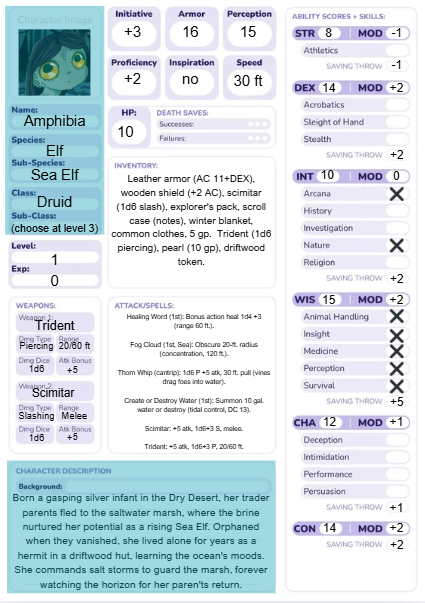
On Amphibia's character sheet, Insight takes WIS +2 and adds prof +2 = +4 (checked). Match each skill to its ability modifier. Add prof bonus (+2) only if the box is checked. Aaaannndddd…done!
This one block does a lot of work. Ability scores feed into your skills, saving throws, and attack rolls. When you see a bonus next to a skill like Stealth or Persuasion, it often comes from these same modifiers. Once you set up the stats block, the rest of the sheet becomes much easier to fill in.
Let’s go over how we got the numbers for Amphibia’s sheet. I find using the standard array method easy, so let’s go with that. Just remember: there is no right or wrong way to do this. If you find a way that works for you, that’s the correct way…for you! The areas we’ll focus on here are highlighted in blue.
- Start with these numbers: 15, 14, 13, 12, 10, 8.
- Pick spots for a Sea Elf Druid. Think about it: she needs high Wisdom for spells, so the 15 will serve us best in WIS. Put 14 in CON for toughness.
- Place the rest: DEX 13, CHA 12, INT 10, STR 8.
- Add Sea Elf bonuses: +2 DEX (13 becomes 14), +1 WIS (15 stays 15).
- Calculate modifiers using the formula. Don’t worry, I’ll show my work!
- STR 8 - 10 = -2 / 2 = -1.
- DEX 14 - 10 = 4 / 2 = +2.
- CON 14 - 10 = 4 / 2 = +2.
- INT 10 - 10 = 0 / 2 = 0.
- WIS 15 - 10 = 5 / 2 = +2.
- CHA 12 - 10 = 2 / 2 = +1.
Now, it’s time to find out what her skills are. They’re highlighted below.
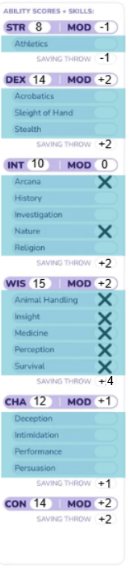
- First, we nailed down her character type as a wise marsh hermit who communes with nature and senses everything around her. This screamed for all the Wisdom skills like Animal Handling, Insight, Medicine, Perception, and Survival to make her the ultimate swamp seer.
- Next, we jumped into her level 1 Druid class options, which feel perfect for her vibe. Druids get to pick two skills from their list, so we grabbed Arcana for her mystical storm secrets and Nature for her deep wild knowledge.
- After that, we added her Sea Elf racial gifts, which boosted her natural Wisdom senses without new skills.
- Finally, we double-checked for a clean fit with no duplicates or extras. Her proficient skills ended up exactly as Arcana, Nature, Animal Handling, Insight, Medicine, Perception, and Survival. Now that’s a skilled character!
Saving throws are like your character's emergency dodge buttons for spells, traps, and dragon breath! They use the same trick as skills: ability mod plus proficiency if trained. Amphibia's sheet shows them right under each ability. Let's break down how we got her numbers, again highlighted below.
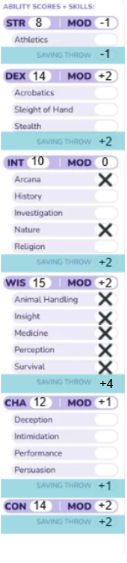
- Start with ability modifiers for each save. Amphibious STR modifier is -1. DEX uses +2. CON uses +2. INT uses 0. WIS uses +2. CHA uses +1.
- Identify class saving throw proficiencies. Level 1 Druid class grants proficiency in Intelligence and Wisdom saving throws.
- Apply proficiency bonus to proficient saves only. Level 1 proficiency bonus equals +2. INT save totals 0 + 2 = +2. WIS save totals +2 + 2 = +4.
- Record final numbers next to each ability. STR -1, DEX +2, CON +2, INT +2, WIS +4, CHA +1 are her saving throws for each respective category.
Combat Essentials: HP, AC, and Initiative
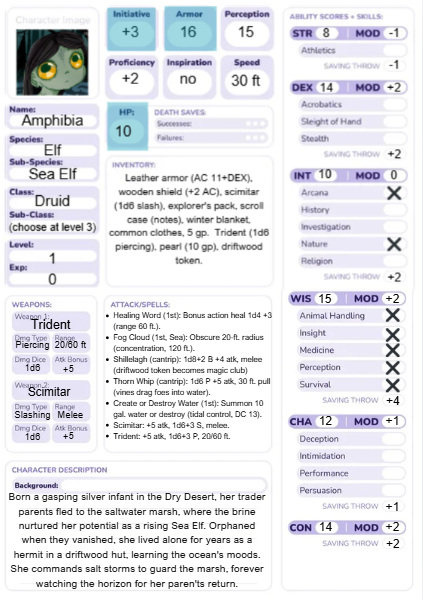
HP, AC, and Initiative are the three big numbers that keep your character alive in a fight. Hit Points (HP) show how much damage you can take before you fall to 0 and drop. To get your starting HP, check your class hit die, take the maximum value, then add your Constitution modifier. At higher levels, you either roll that die or take the average, then add your Con modifier again. Armor Class (AC) is the number enemies must meet or beat to hit you, and it comes from your armor, shield, and Dexterity modifier. Initiative is what you roll at the start of combat; you roll a d20 and add your Dexterity modifier to see who goes first. Since class, armor, and Dexterity affect all of these, they will change as you level up and change gear, and you should update your current HP every time you take damage or get healed.
Hit Points (HP) shows how much damage you can take before you fall to 0 and drop.
- Check your class hit die. Druid uses 1d8.
- Take maximum at level 1: 8 hit points.
- Add Constitution modifier: 8 + 2 = 10 HP.
- Write 10 in the HP box. Track current HP separately since it changes in fights.
Armor Class (AC) is the number enemies must meet or beat to hit you.
- Start with an armor base. No armor shown, so unarmored defense applies.
- For Druids, AC often uses 10 + Dex mod + Wis mod.
- Add Dex +2 and Wis +2: 10 + 2 + 2 = 16 AC.
- Write 16 in the AC box. Update if she gets armor later.
Initiative determines who goes first in combat.
- Roll a d20 at fight start.
- Add Dexterity modifier: +2 from DEX 14.
- Sheet shows +3 total, so +1 bonus from feature or item.
- Write +3 next to Initiative. Roll d20 + 3 each combat.
Spellcasting, Inventory, and Weapons…Oh, My!
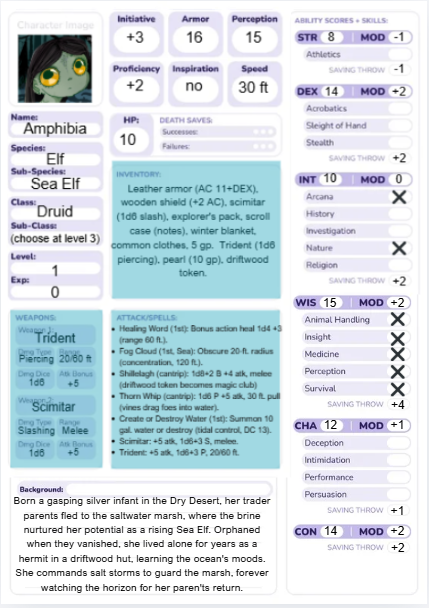
The spellcasting and class resources section is your home base for all your “limited use” powers. This is where you track spell slots, sorcery points, ki points, rage uses, and any other fuel your class spends during play. Every time you cast a leveled spell, rage, use ki, or spend points, you should mark it off so you know how much power you have left.
Try to pick spells and features that match your character’s theme, like nature magic for a druid or fiery spells for a hot headed sorcerer. When you level up, your slots and resource counts often go up too, so make sure you update those numbers. You can also use CharacterHub to track how your powers grow over time and keep notes on which spells or abilities you use the most.
It’s rude to ask to see inside a woman’s purse, but we’re talking about rucksacks in a magical swamp here! So, we’re free to take a peek.
- First, we started with her class and background gear. This included leather armor (AC 11+DEX), wooden shield (+2 AC), scimitar, explorer's pack, scroll case with notes, winter blanket, common clothes, and 5 gold pieces.
- Next, we added her weapons. This brought in the trident and scimitar.
- Then we included her story items. She carries a pearl worth 10 gp and a driftwood token from her parents. (This token can also be used to do some attacks!)
- Finally, we listed everything neatly in her inventory section and confirmed her AC calculation (leather 11+2 DEX +2 shield = 15, adjusted to 16 with features).
Weapons. Now things are getting interesting!
- First, we listed each weapon with damage type and range. Trident does piercing damage with 20/80 ft range. Scimitar does slashing damage at melee range, which is around 5 feet. This gives her a good long range and short range weapon.
- Next, we calculated the attack bonus for both. Proficiency +2 plus Wisdom modifier +2 equals +4, plus +1 from a feature gives +5 attack for both weapons.
- Then we figured out the damage each weapon can blow. Both weapons do 1d6 +3 damage (her Wisdom modifier).
- Finally, we filled the weapons table exactly as shown: Trident (+5, 1d6+3 piercing, 20/80 ft) and Scimitar (+5, 1d6+3 slashing, melee).
Now, for the most magical part: spells! And attacks, too.
- First, we checked her class spellcasting rules. As a level 1 Druid, she knows 2 cantrips and can prepare Wisdom modifier plus Druid level spells, which equals 2 + 1 = 3 spells, but she gets extras from race.
- Next, we picked her cantrip from the Druid list. Thorn Whip jumped out because the 30 foot vine pull fits her dragging foes into the water theme perfectly.
- Then, we chose her 1st-level spells to match her hermit Sea Elf story. Healing Word became her bonus action team heal (1d4 + 3 healing, 60 foot range). Fog Cloud came free from the Sea Elf trait (20 foot radius obscurement, concentration, 120 foot range). Create or Destroy Water nailed the tidal control (10 gallons create or destroy, DC 13).
- After that, we calculated attack rolls. For Thorn Whip, proficiency +2 plus Wisdom +2 plus feature +1 equals +5 to hit.
- Finally, we wrote everything in the Attack/Spells section with damage and details: Thorn Whip (+5, 1d6 piercing, 30 ft pull), Healing Word (bonus 1d4+3, 60 ft), Fog Cloud (20 ft radius conc. 120 ft), Create Water (10 gal DC 13). She tracks 2 first-level slots.
Growing Your Character Beyond the Sheet
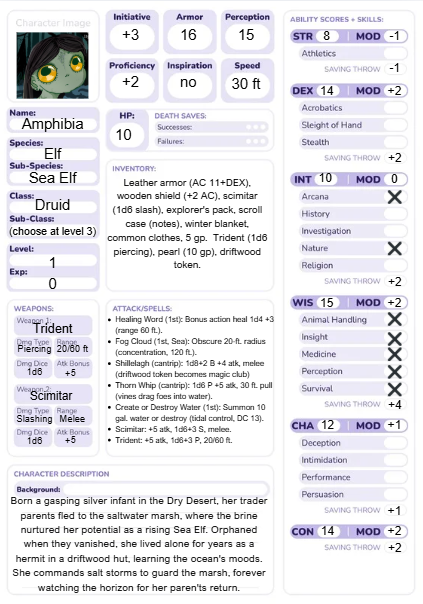
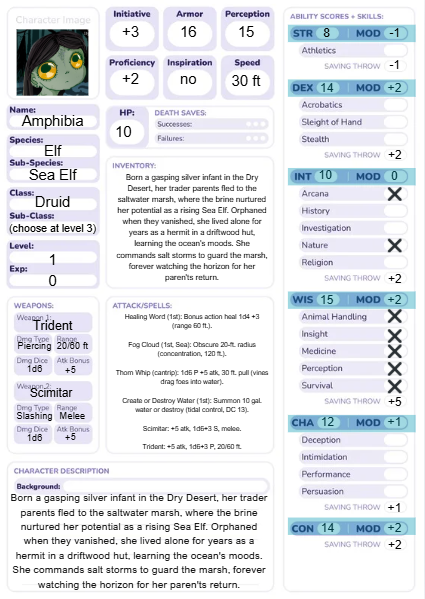
Drumroll please…here’s the final filled in sheet! But don’t fret, your character’s development is far from over. The character sheet is a succinct summary of who they are, but it doesn’t contain your character completely.
Notes, Backstory, and Deep Lore Sections
Not everything about your character fits inside numbers and boxes, and that is where the notes and lore sections come in. These spaces hold all the extra story details that help your character feel real. You can use them for fast notes each session, like “met a new patron at the tavern” or “found a strange key in the ruins.” Add a short backstory summary so you always remember their past in a few lines. Leave room for hidden secrets, relationships with NPCs, and long term goals you want the DM to play with. If you are using a digital sheet, you can also link it to a full CharacterHub profile, where you can store long form backstory, character timelines, and deeper worldbuilding.
Digital vs Paper: Picking Your Perfect Toolkit
There is no one “best” toolkit; both paper and digital options have pros and cons. Paper character sheets and notes are simple and friendly. They are easy to grab, do not need a battery, and you can doodle, cross things out, or jot quick notes in the margins. The downside is that they can get messy, tear, or go missing, and big changes can be hard to keep neat. Plus, they can take longer to write, and depending on your handwriting, can look like a kindergartener’s work.
Digital tools are great for quick edits, search, and sharing your sheet with the DM and other players. They make it easy to fix mistakes, copy a backup, or pull up rules in a second, but you do need a device and power. Tools like CharacterHub shine here, because they store deep lore, art, and long term notes all in one place. A “best of both worlds” trick is to use paper at the table for quick numbers and doodles, then update a digital version after the game. Try both styles for a few sessions and see which mix makes your game feel smooth and fun. Again, this is a super subjective thing, so whatever works best for you is the right way for you to do it!
Running Smoother Sessions with Smart Tools
Turning Your Tools into Story Power
Your tools are not just there to track numbers. They can actually help tell a better story at the table. A character sheet, your notes, and simple trackers can highlight your hero’s goals, fears, and relationships so they stay in the spotlight during play. Initiative trackers, campaign managers, loot logs, and story timelines can help you and your DM spot new hooks and future twists based on what has already happened.
CharacterHub takes this even further by turning simple stats and notes into full profiles, character arcs, and links to places and factions in your world. When you use your tools to call back old choices and events, the world feels alive and reactive. The best tools are always the ones that make it easier to focus on story and fun, not on extra paperwork.
Keeping Your Table on the Same Page
When everyone sees the same information, the game runs much smoother. Players can follow the story, understand their options, and feel more confident making choices. You can use shared tools for campaign notes, maps, and handouts so important details are not locked in one person’s notebook. Short written recaps or CharacterHub updates after each session help the group remember past events and hooks. Plus, it’s a nice little ritual that can help settle down the session and return back to the real world. Keeping your key rules and house rules in one easy place saves time and avoids arguments. Digital spaces are great for storing links and documents, while physical props and index cards bring fun texture to the table. Regular check ins with your group help you adjust the game so everyone is still having the kind of fun they want.
Simple Routines for Session Prep
A steady prep routine can keep your sessions running well without a ton of extra work. Begin by recapping the last session for yourself: what did the party learn, who did they meet, and what did they leave unfinished? Check your notes and update any NPC and character details that changed, like new allies, enemies, or promises. Sketch out two or three scenes or encounters that are likely to happen and one backup scene if the group goes in a new direction. Use CharacterHub or similar tools to review your players’ character goals and past choices so you can weave them into these plans. Make sure your maps, loot lists, and trackers are up to date. Finish by writing a single sentence goal for the night’s session so you know what you want to see happen.
From First Session to Epic Saga
Tracking Character Growth Across Sessions
Your character’s story does not stop once the sheet is filled out, and CharacterHub helps you keep up with every step. You can use it as a campaign manager by building a character timeline that logs key sessions, level ups, new abilities, and turning points in their story. Each entry can link back to notes, art, and worldbuilding, so you see how your hero changes in both numbers and personality. When you bring together your character sheet, your notes and deep lore sections, and the extra space in CharacterHub, you get a full toolkit: stats to play the game, story tools to explore who your character is, and a timeline to show how far they have come. It is a neat way to wrap everything up and see the whole arc of your character at a glance.
Join the CharacterHub Community
Your character sheet is a great start, but your character’s “home” can be bigger. At characterhub.com, you can turn that one hero into a full profile with images, long form backstory, and connected lore. You can keep some characters private, share others, and explore a community full of people who love creating OCs just as much as you do. If you’ve read this far, why go ahead and give characterhub.com a try?

Scarlett Bittle
With a pencil as her magic wand, Scarlett Bittle aims to spread the magic of creation to the world. She’s a multimedia artist, with experience experimenting with a spectacular spectrum of mediums. If you’re drawn to see more of her work, check it out on her instagram.
Find Out More.jpg)
.jpg)
