.jpg)
Why Field Notes Keep Your Campaign Alive
The Three Things Every DM Forgets
Let’s be honest: when you’re in the middle of a wild DnD session, the last thing you want to do is stop the action to write things down. You are busy moving minis, rolling dice, and keeping the energy high. It is so easy to get caught up in the fun and forget to record what happened. But here is the secret: notes are your best weapon as a DM. They’re the bedrock of a long and healthy campaign. When you write down the small details, you protect the memory of your world.
It’s the power of the past that you can use to haunt the future. Did a player steal from a witch’s farmstand for a magic item? Maybe her curse finds them later because of that one choice. That specific moment might feel like a throwaway joke in the heat of the moment. An easy way to avoid using limited gold, and to get out of doing a magical challenge or a fight to get the item. However, when you note it down, it becomes a plot hook for your next session. You can use your notes to grow the plot or explore deep character arcs. They turn a random encounter into a story that your players will talk about for months.
So, what are the 3 things DMs often forget? Notes, notes, and…yup, you guessed it. Notes. To organize them, to reference them, or even to take them. I mean, I get it. They can be boring. But they’re important, I tell you! But seriously, short term memories only last 15-30 seconds. If they’re not written down, they disappear into the ethos. Forever lost. So, don’t let yourself lose the coolest details of the session!
Your Field Notes Kit (5 Items Max)
You don’t need a mountain of gear to be a great DM. A simple kit works best, since it helps you move fast and keep your focus on the game instead of your supplies.
If you like paper notes, start with a pocket notebook and three colored pens. The notebook gives you one place for all your session notes. Plus, the different pen colors make it easy to sort details at a glance. You can use one color for NPCs, one for loot, and one for plot hooks or player choices. Add a pack of sticky notes too. They’re great for quick reminders, page flags, and ideas you want to move around later. A waterproof pen is also smart, because spilled drinks and sticky table chaos happen more often than you think.
If you prefer digital notes, a tablet or laptop can do a lot of the same work. A tablet with a stylus gives you the feel of writing by hand, while still letting you save, search, and move notes easily. A laptop is great if you like typing fast or keeping several tabs open at once. You can also use your phone camera to snap battlemaps, handouts, or table sketches in just a few seconds. That way, you don’t have to rely on memory when the session gets busy.
For either style, keep your kit light and easy to reach. The goalisn'tto carry everything you own. The goal is to have the few things that help you catch the important stuff without slowing the game down.
No More "Wait, What Happened Last?"
The middle of a DnD session can get messy. Fast. One minute the party is in a fight, and the next they are chasing a clue, talking to an NPC, or making a big choice that changes everything. That is why it helps to have a fresh document ready at the start of every session. When you are ready to write as you go, it is much easier to keep your notes clear and useful.
A simple summary formula can save you a lot of stress later. Try this: Who was there, what happened, and most importantly, what changed? That gives you a clean structure without turning your notes into a full story recap. You can also add one final line for the biggest hook or cliffhanger at the end. That way, when the next session starts, you won't have to stop and ask, "What did we do last time?" because the answer will already be right there.
Make Session Zero Your Planning Party
Session zero is the first big planning meeting for a DnD campaign. It’s where the group sits down before play starts and talks about what kind of game they want to build together. This is the time to go over tone, themes, table rules, and any topics that should be avoided.
It’s also the best time to talk about note-taking, because good notes can save everyone from the dreaded “Wait, weren’t you in charge of taking notes this time?!” moment. If one player is assigned to recap the session, or if the DM wants to keep a campaign log, session zero is where that plan should be made clear.
The best part of session zero is that it doesn’t have to feel stiff or formal. It can still be fun and creative. Think of it like setting up the game before the game. You aren’t trying to control every little thing that will happen later. You are just making sure everyone knows the basics and feels ready to jump in. That also makes it a great time to decide how notes will work during the campaign. Maybe the DM keeps a main timeline. Maybe a player writes down NPC names and quest clues. Maybe the group shares one recap doc after each session. However you do it, the goal is the same. You want a simple system that helps everyone remember what matters.
Session zero also helps players feel more comfortable with the story ahead. It gives the group a chance to talk through what kind of play style they want, whether that is combat-heavy, roleplay-heavy, or somewhere in between. It can also help with practical things like scheduling, home rules, and character ideas. When people know what to expect, they can build characters that fit the world and pay attention to the details that matter most. That is where note-taking becomes really useful. If the group agrees early on who is tracking what, then important story beats are much less likely to get lost.
You can also use session zero to plan for the moments when notes matter most. For example, if the campaign has lots of NPCs or faction politics, one player might keep track of names and alliances. If the game has lots of combat or dungeon crawling, the DM might use quick notes to track loot, locations, and unfinished scenes. If the group prefers digital tools, session zero is the right time to decide what app or shared doc will be used. If the group likes paper, they can choose a notebook system that is easy to keep up with at the table. A little planning here can make the rest of the campaign feel much smoother.
Gear Up Your Note-Taking Kit
Digital Tools That Don't Slow You Down
Digital tools can make note-taking a lot easier when they stay out of your way. A note app like Notion can keep all your session details in one place, which is helpful when you want to sort NPCs, quests, loot, and player choices without digging through a gigantic stack of paper.
Your phone camera is great for battlemaps. You can snap a quick photo in seconds and keep the layout for later. If you struggle taking notes, here’s a little digital short cut. It’s not perfect, and regular notes are always better than cutting corners. But tools to make things easier is never something to totally leave out.
All you have to do is take an audio recording of the session. Then, get the transcript of the recording. Now, you can paste that into Google Docs or a similar platform. If you just need a quick summary of what happened, you can skim it. Or, if you need something specific, you can press the control key and the f key at the same time. This will allow you to search your document for keywords, and you can quickly find what you’re trying to reference. Again, this method isn’t the most robust for taking notes, but it can help in a pinch!
A tablet with a stylus gives you the best mix of paper feel and digital search power. (Try out a “paperlike” screen protector to give you that real paper feel!) You can write by hand, sketch ideas, move notes around, and still search or organize everything later. Some players also like scanning notes into their CharacterHub gallery. That way, their art, builds, and story notes all stay in one place. If you still like an analogue feel, you can even mix both styles. Just tape CharacterHub reference sheets into a notebook or keep printed pages to reference.
Organize Backstory, Stats, and Style
A truly great character is built from more than just numbers on a page. Their backstory gives them depth, their stats show what they can do, and their style helps the whole idea feel real. When those pieces stay connected, it is much easier to understand who your character is and how they should grow. That matters a lot in DnD, where a character can change fast through choices, fights, and roleplay.
CharacterHub makes that kind of character tracking a lot easier. You can use it to store your OC’s backstory, world details, lore, and more. All the little ideas that help your character feel complete! The timeline feature is especially useful when you want to keep track of big moments over time. Like major fights, story shifts, new relationships, or character arcs. Instead of letting those details get lost, you can build a clear record of your character’s journey.
Another great part of CharacterHub is how flexible it is. You can add custom sections to your character profile. That means your character doesn’t have to fit into a tiny box. You can make space for things like family history, important items, plot hooks, and goals. Or, anything else that helps explain who they are. It is a nice way to keep everything organized without losing the fun parts of character building.
CharacterHub also gives you room to make your profile feel creative, not just practical. You can upload art, save screenshots of notes, add moodboards, share music, and more. That makes the profile feel more alive. It can hold both the story side and the visual side of your character. If you like building characters who feel rich, layered, and easy to revisit, CharacterHub is a really useful place to keep it all together.
Sticky Notes Beat Long Paragraphs
Sticky notes are perfect for fast thinking at the table. The best rule here is K.I.S.S., which means keep it simple. When the session is moving fast, you don't need full paragraphs. You just need the one fact that matters right now. A short note is easier to read, easier to move, and much easier to trust when things get busy.
Try to keep one fact on each sticky note. That way, you can sort them faster later and shuffle them around when plans change. You can also color-code them by type, whether you use physical sticky notes or digital ones. For example, red can mean danger and yellow can mean loot. That little system makes it easier to find the right info at a glance.
The real magic of sticky notes is how flexible they are. You can slap them onto your DM screen, move them when the scene changes, and layer them as new details come up. During the session, they help you stay focused on the important stuff. Later, you can turn those quick notes into a fuller recap if you want.
Use Colors to Sort Your Notes
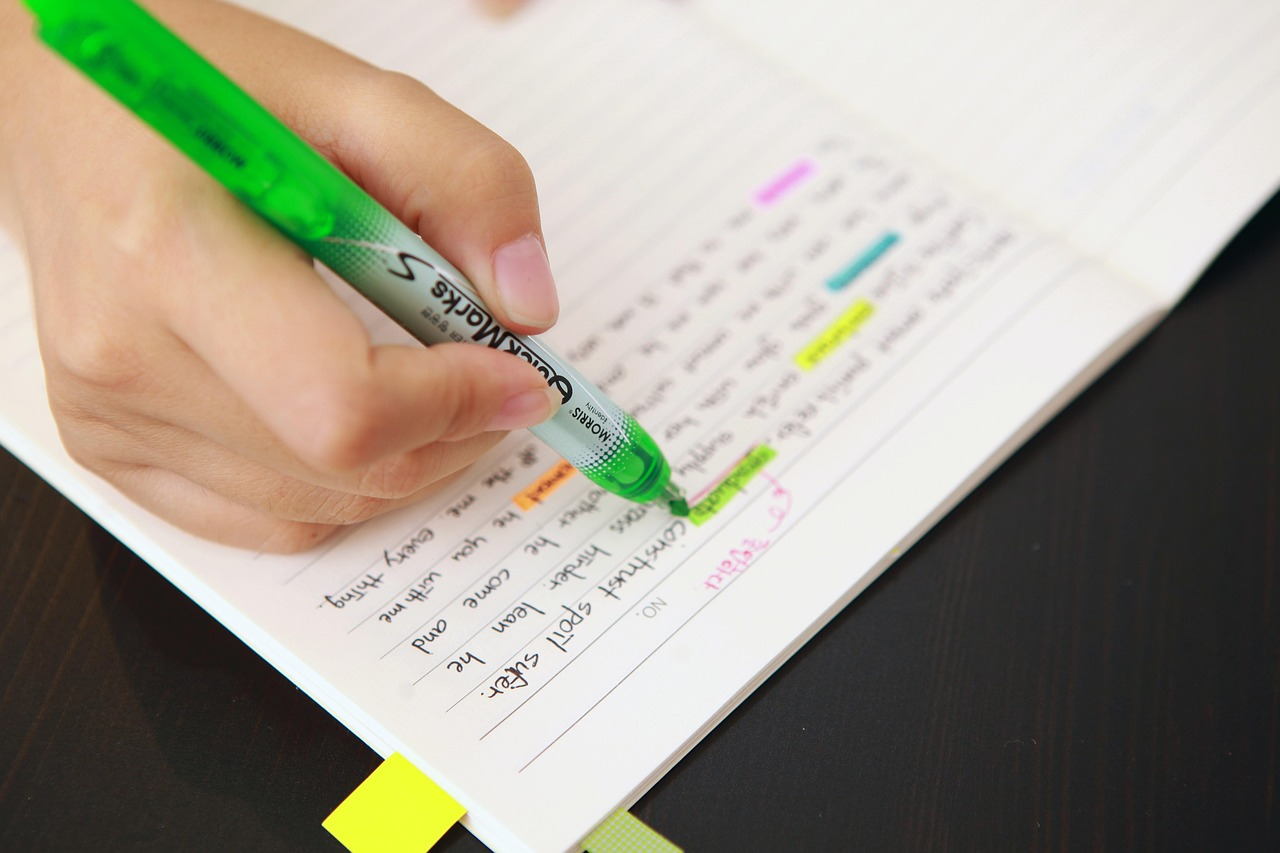
Color coding can make your notes much easier to read at a glance. When you give each type of detail its own color, your brain doesn’t have to work as hard to find what it needs. You can use one color for danger, one for loot, one for NPCs, and one for clues or quests. That way, your notes stay neat, and you can spot the important parts much faster during a busy session. (Plus, they’ll be pretty!)
This method also helps when you need to look back at your notes later. If everything is written in just one color, it can all start to blend together. But if your notes are sorted by color, you can tell what kind of information you are looking at right away. That saves time and helps keep your campaign details from getting lost in a big wall of text.
You can use color coding with paper notes or digital notes. If you are writing by hand, try using pens or sticky notes in different colors. If you are using a notes app, you can use highlights, tags, or labels instead. The main idea is the same either way. Pick a system that is simple, easy to remember, and fast to use while the game is still moving.
Master the One-Minute Session Note
A good session note doesn’t need to be long. In fact, the best ones are usually short and sharp. Hit the big beats, skip the filler, and write only what you will actually need later. If you can read it in a few seconds, you are probably doing it right.
A simple way to do this is to focus on who, what, and where. Write down who was involved, what changed, and where the scene ended. That gives you a clean snapshot of the session without making you sort through extra fluff later. It also makes it much easier to pick up the story next time.
At the end of the session, think about what would be most helpful for the next recap. That should be the heart of your summary. You aren't trying to write a full story report. You are just giving everyone the key info they need to jump back in fast. If you want to make it fun, let the group vote on the best session quote before everyone packs up.
Notes + CharacterHub = Campaign Perfection
Player Character Updates in Real Time
One of the best things about keeping notes digitally is how easy it is to keep character updates in sync. When you link PC sheets to a session timeline, something magical happens. You can track changes as they happen instead of trying to remember them later. New spells, level-ups, and other updates can stay tied to the right moment in the campaign. This makes the whole story way easier to follow. Then, your character sheet always feels current. Not like a forgotten snapshot from three sessions ago.
You can also share a gallery of PC upgrades so everyone can see how the party is growing over time. Maybe a character gets new armor, a fresh spell list, or a big visual change after an important event. Having those updates in one place makes it easier to celebrate progress and keep the campaign history alive. Notes can even be shared in custom chat rooms. This gives your group a simple way to talk about changes, swaps, and next steps without losing track of anything!
Check out this example of what you might see in a character profile on CharacterHub! Here, you can see the character’s lore and basic “about” section:
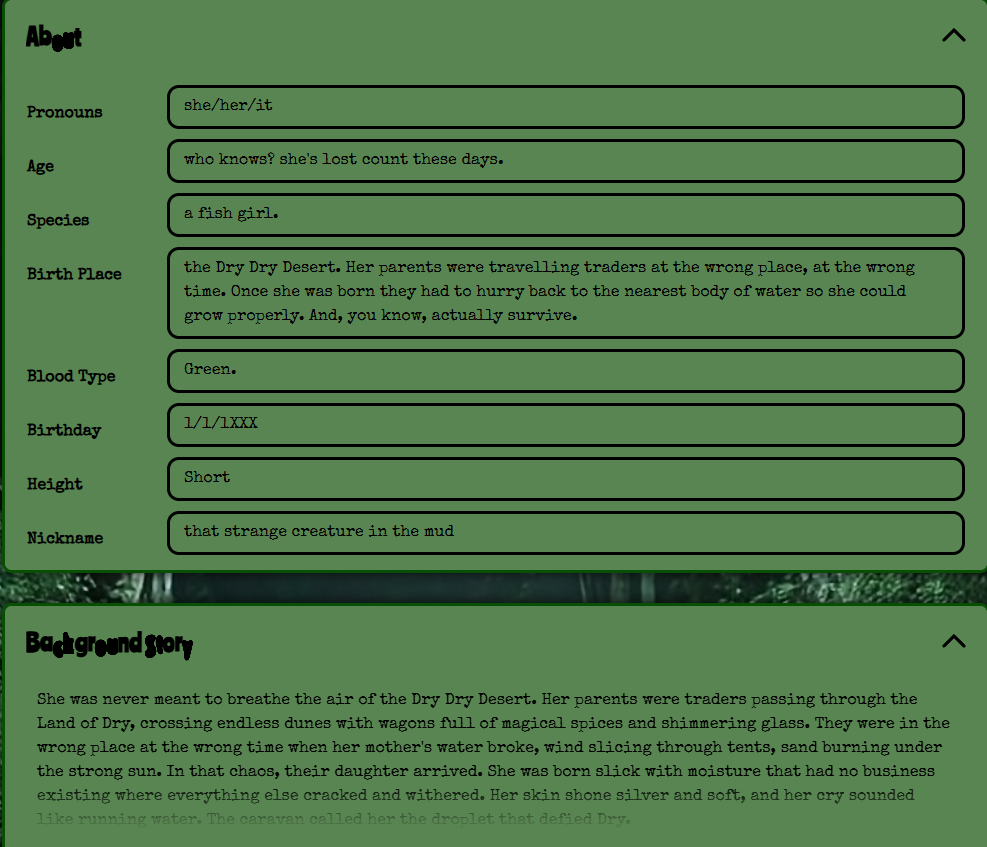
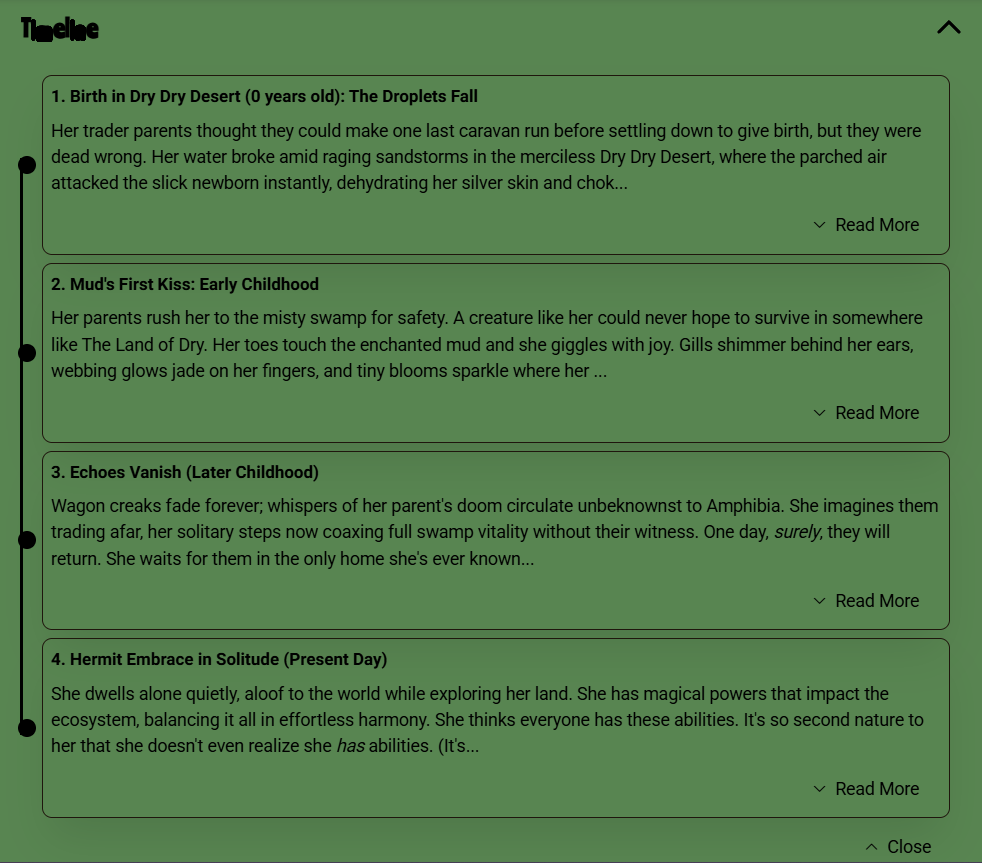
As you can probably tell, I went to town decorating and customizing this character’s profile. From the font to the background color, you can make every part of their profiles completely unique. Or, you can keep it totally simple and focus on keeping the character’s info updated. Remember, what works for you is always the “right” way!
What to Track During a DnD Session
What you track during a DnD session should depend on what will most likely matter later. The goal isn't to write down every single thing that happens. Instead, it’s to catch the details that would be super annoying to forget. That usually means NPC info, important locations, loot, and quest hooks. Plus, big choices the party makes along the way.
It also helps to track anything that could come back later in the story. If a player makes an enemy, promises a favor, steals something, or takes a weird detour, write it down. Small moments can turn into huge plot points later, and notes are what keep those threads alive. The same goes for clues, rumors, and anything tied to the campaign’s bigger mystery or main goal.
You should also keep an eye on party updates and scene changes. That can include new spells, level-ups, injuries, and map changes. Or, anything that shifts the state of the game. If the group talks through a plan or makes a decision that changes the next session, that belongs in your notes too. A good rule is simple: if you would be upset to forget it later, it is worth writing down now.
Easy Ways to Recap a Session Fast
Session recaps work best when they stay simple and focused. You don't need a full story breakdown to remember what happened. You just need enough detail to bring the game back to life next time. That is what makes a recap worth writing in the first place.
Next time you’re recapping the last session, try one of these:
- Write a 3-line summary with who, what, and what changed.
- Make a bulleted list of the top 3 events from the session. (Put a star next to the most impactful event!)
- Keep a running note during play, then clean it up at the end.
- Ask one player to give a quick verbal recap (1 minute or less!) before the group leaves.
- Use a simple template like “Goal, Trouble, Result.”
This style works especially well when the game gets busy. Maybe the party met an NPC, found a clue, or made a choice that changed the story. Those are the details worth saving, as small as they are. A simple recap like this helps everyone jump back in faster next time, and it keeps your notes from turning into a wall of text.
Store Your Notes, Art, and Worlds All in One Place
Keeping good DnD notes doesn’t have to be hard. When you track your sessions, your characters, and your world in one place, it becomes much easier to stay organized and keep the story moving. CharacterHub is a great place to store character notes, world details, art, and other important pieces of your campaign.
You can also use Social Spaces to share session notes, talk through changes, and keep your group in sync. If you want your campaign records to feel easy to manage and fun to revisit, CharacterHub gives you the tools to do it. So, make a free CharacterHub account today and get ready to be more organized than ever!

Scarlett Bittle
With a pencil as her magic wand, Scarlett Bittle aims to spread the magic of creation to the world. She’s a multimedia artist, with experience experimenting with a spectacular spectrum of mediums. If you’re drawn to see more of her work, check it out on her instagram.
Find Out More.jpg)